

What is TableSync Solo?
TableSync Solo is a free app for playing fifth edition adventures alone, on Android or in any browser. It plays gamebook adventures with real checks and fights, runs a GM-less oracle for freeform play, and has a studio for writing adventures of your own.
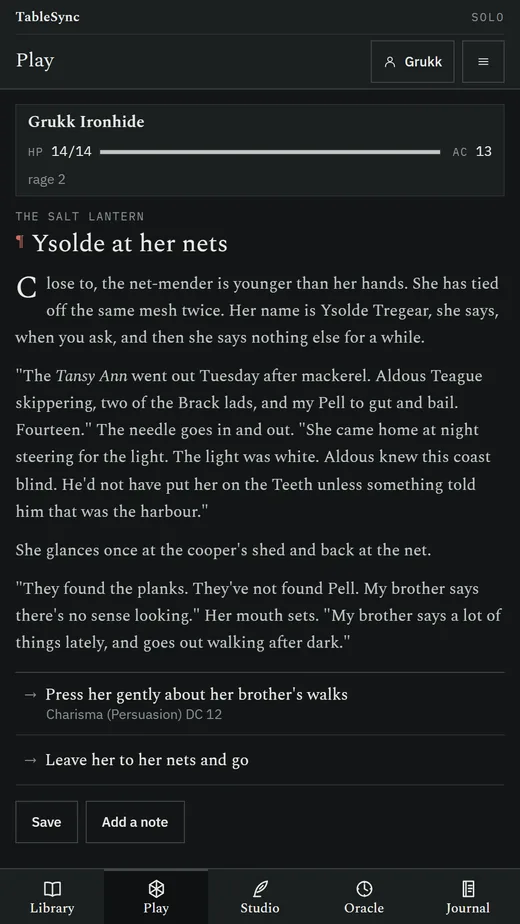
Some nights there is no group. Solo is the table for one: a scene to read, choices to make, and dice that decide the hard ones. When a choice needs a check, the app rolls a d20 with your hero's modifier where you can see it, shows the DC and branches on the result. When a scene starts a fight, it runs initiative, your attacks and spells, and the monsters' actions from their SRD stat blocks.
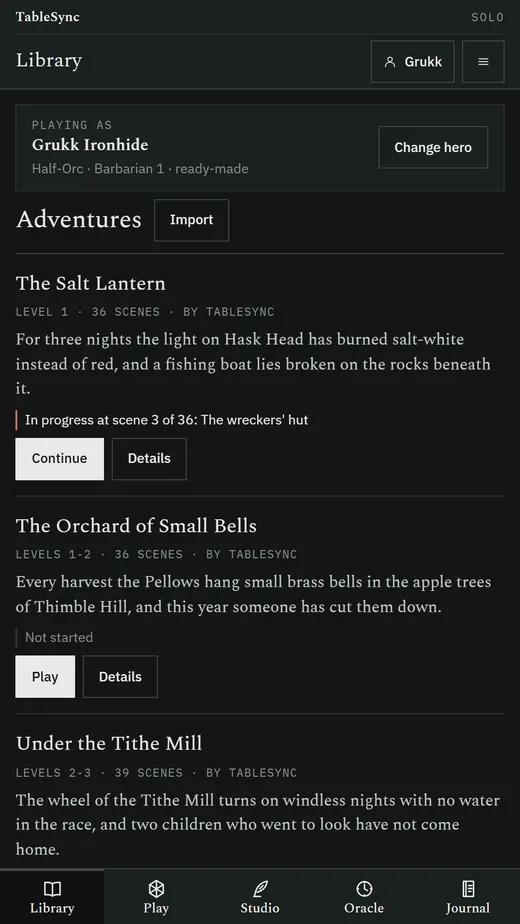
Three original adventures come with the app: The Salt Lantern (level 1), The Orchard of Small Bells (levels 1-2) and Under the Tithe Mill (levels 2-3). More come from whoever writes them: you, in the studio or any text editor, or a friend who sends you a file.
What can TableSync Solo do?
Five tabs: Library, Play, Studio, Oracle and Journal.
Three adventures to start
The Salt Lantern, The Orchard of Small Bells and Under the Tithe Mill: original adventures for levels 1 to 3, 36 to 39 scenes each, with four to six endings, 15 to 21 checks, five or six fights, items that open better paths and choices that change later scenes. The library shows each one's levels, length, hook and how far you got.
Checks you can see
A choice with a check rolls d20 plus the hero's ability, skill or saving throw modifier, with proficiency and expertise, and shows the maths and the DC unless the adventure hides it. Conditions bring advantage or disadvantage the way the SRD says.
Turn-based fights
Initiative, then on your turn Attack with each weapon, Cast your cantrips and attack and healing spells with their slots, use a potion, Dodge, or Dash and Disengage where the scene lets you flee. Monsters act by their SRD actions, multiattack included, and death saves wait at zero.
Any hero you like
Play your own character from TableSync Player, a ready-made hero, or a quick hero: pick a class, an ancestry and a name, and the rest is filled in at level 1 from the SRD.
The hero goes home
When an adventure ends, send the hero back to TableSync Player with the hit points, gold and items gained written into the Player's own fields, and nothing the Player does not have. Solo never levels a hero up; the Player does that.
Saves, and a story mode
Every scene saves itself, with three save slots per adventure. Story mode, off by default, lets you take back your last choice, and the journal marks that you did.
A journal of the run
Every scene visited, every choice, every roll with its result, every fight, and your own notes, exportable as Markdown.
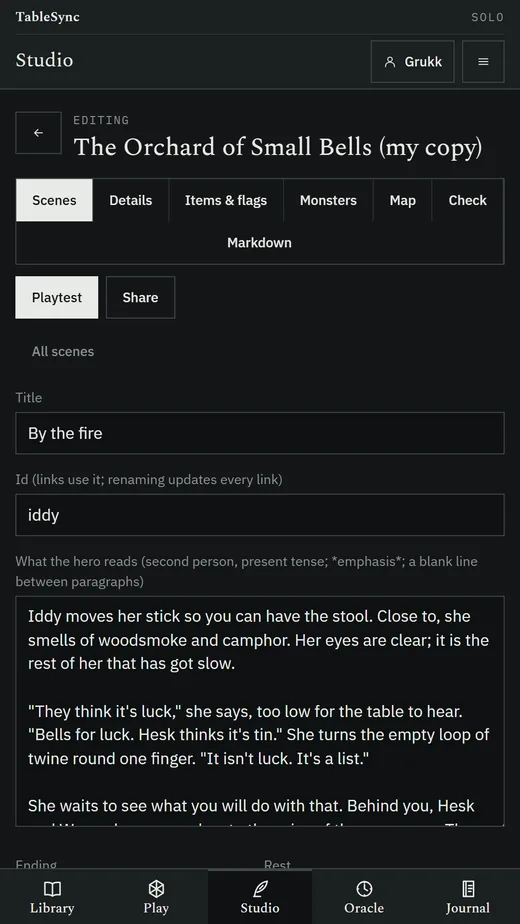
A studio for writing adventures
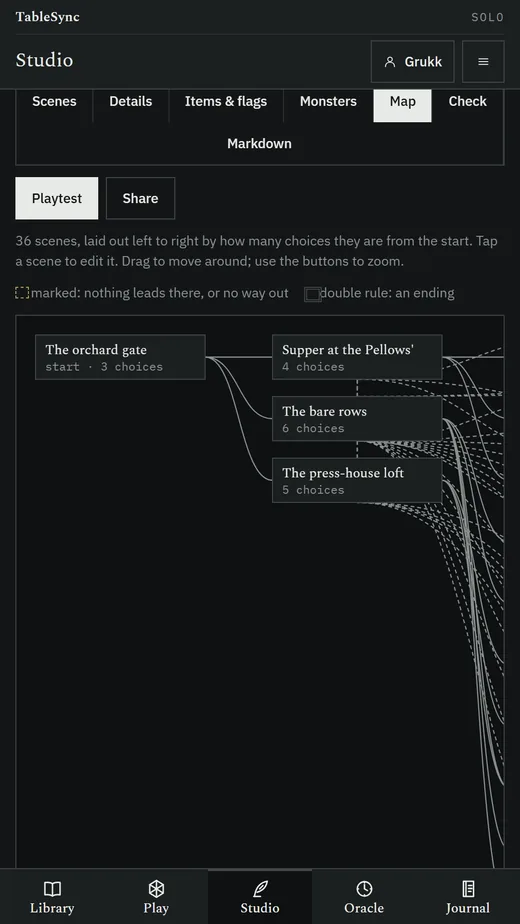
Scenes, choices, checks, fights with SRD monsters, items, flags and endings. The adventure map draws every scene and its links and marks the scenes nothing reaches and the dead ends.
A checker before you share
Validate on demand: missing targets, unreachable scenes, scenes with no way out that are not endings, unknown monsters, items and flags, checks without a DC, each with a Go to button. Playtest from any scene, with a mode that shows flags and forces checks.
Solo Markdown
Write an adventure in any text editor: a heading per scene, prose, and choices as list items with their checks and fights. It converts to the app's JSON format and back without loss.
Share adventures
Export any adventure as a file, a code you can paste into a chat when it is small enough, or Markdown. An import is checked whole, and every problem is named with its scene before anything is saved.
An oracle for freeform play
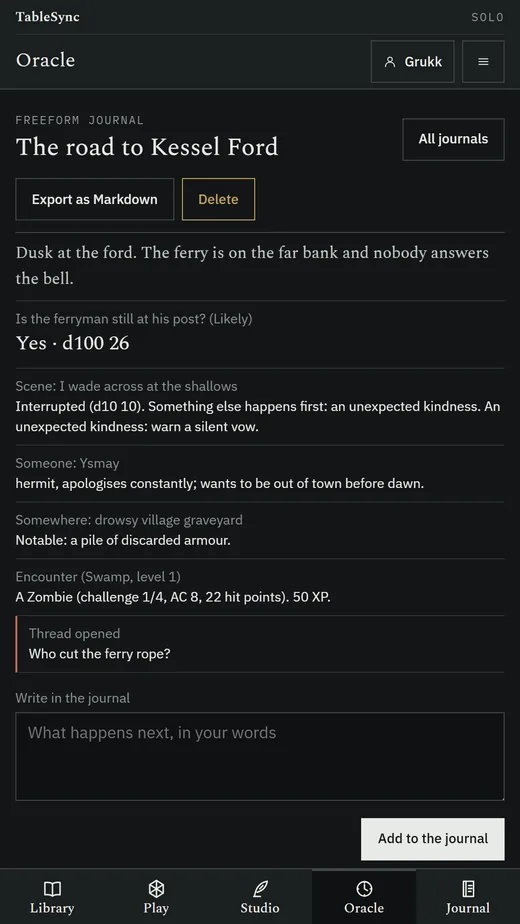
Ask a yes-or-no question at a likelihood from certain to impossible and get yes or no, with and/but twists and the odd random event. Scene setups, meaning prompts from original word tables, NPC and location prompts, and a random encounter for your hero's level.
A freeform journal
The oracle's journal keeps open threads and characters in lists and logs everything rolled where it happened, exportable as Markdown.
Phone and tablet
Laid out for phones, 7-inch and 10-inch tablets. On a 10-inch screen the scene sits beside the hero panel, and the studio's editor beside its scene list.
How does TableSync Solo work with the other TableSync apps?
Each TableSync app has one job and hands its work to the others as a file or a code, with no account and no server in between.
- From TableSync Player: your character, to play an adventure with.
- Back to TableSync Player: the same character after the adventure, with what they earned. The Player opens it in its usual import, with Replace or Keep both.
- To a friend's TableSync Solo: an adventure you wrote, as a file or a code.
On Android, Send goes straight into the other app when it is installed, and to its page when it is not. Anything sent of the wrong kind is refused with the name of the app that opens it: an encounter belongs in TableSync DM, not here.
Should I use the Android app or the web app?
Use the Android app to play on your phone anywhere, signal or not. Use the web app on a computer, an iPad or an iPhone, or to write adventures with a keyboard: it is the same app at undeployedadam.com/tablesync/solo/, kept in that browser.
| Android app | Web app | |
|---|---|---|
| Get it | Free APK, 3.7 MB | Open the address; add it to the home screen |
| Runs on | Android 7.0 and later, phones and tablets | Any current browser |
| Offline | Yes, and it has no internet permission at all | Yes, after the first visit |
| Sending a hero home | Straight into TableSync Player | As a downloaded file |
| Progress kept | In the app, on the device | In that browser, on that device |
How do I install TableSync Solo on Android?
TableSync Solo is coming to Google Play. Until then it installs from a file, which Android calls sideloading.
- On your phone, tap Download for Android. The file is
TableSync-Solo-1.0.0.apk, 3.7 MB. - Open the downloaded file. If Android says your browser is not allowed to install unknown apps, tap Settings, turn on Allow from this source, and go back.
- Tap Install. Android may warn that the app is from an unknown developer, because the file is not delivered through Google Play. Check it under Verifying the APK if you want to be sure it is the one published here.
- Open TableSync Solo, pick an adventure in the Library, and choose a hero.
What does TableSync Solo do with my data?
It keeps it on your device, and it cannot do otherwise: the Android app declares no internet permission. There is no account, no TableSync server, no advertising, no analytics, no crash reporting and no third-party SDK.
- Heroes, adventures you import or write, progress, saves and journals stay in the app's own storage on the device.
- Sending a hero or an adventure goes where you send it: another app on the device, the share sheet, or a file you save.
The full text is the TableSync privacy policy.
What does TableSync Solo need to run?
- Android 7.0 or later, on a phone or a tablet; layouts for phones, 7-inch and 10-inch screens.
- Permissions: vibration, for the dice, and nothing else. No internet, location, contacts, camera, microphone or files.
- In a browser: any current browser on a computer, tablet or phone, iPad and iPhone included.
- Size: 3.7 MB to download, with the bundled adventures and the SRD monsters, spells and items inside.
Questions
What is TableSync Solo?
TableSync Solo is a free app for playing fifth edition adventures alone, on Android and in any browser. It plays gamebook adventures with real checks and turn-based fights, keeps a journal of every roll and choice, offers a GM-less oracle for freeform play, and has a studio for writing and sharing adventures.
Is TableSync Solo free?
Yes. It is free, with no account, subscription, in-app purchase, advertising or telemetry. The code is MIT-licensed and the bundled rules content is the SRD under CC BY 4.0.
Does TableSync Solo need the internet?
No. The Android app declares no internet permission at all, so it cannot send anything anywhere; adventures and heroes move only as files or codes you share yourself.
Can I play with my own character?
Yes. Send your character from TableSync Player, or open a character file it exported. After the adventure, Solo sends the hero back with the hit points, gold and items they came out with; you level up in the Player as usual.
Can I write my own adventures?
Yes. Write them in the studio, with its adventure map and checker, or in any text editor in Solo Markdown, a plain-text format the app imports and exports. Share one as a file, a code or Markdown.
Does TableSync Solo use AI to write the story?
No. Every adventure is written by a person: the three that come with the app were written for it, and the rest are the ones you write or import. The oracle draws from original word tables with dice, not a language model.
Is TableSync Solo on Google Play?
Not yet: TableSync Solo is coming to Google Play. Today it is a free APK download from this page, version 1.0.0, for Android 7.0 or later, and a web app in any browser.
Is TableSync Solo an official product?
No. It is an independent, free tool, not affiliated with, approved or endorsed by Wizards of the Coast. Its rules content is the System Reference Document, which Wizards of the Coast publishes under CC BY 4.0.
Verifying the APK
The file is TableSync-Solo-1.0.0.apk, 3.7 MB, published
2026-10-23. On a computer:
Get-FileHash "TableSync-Solo-1.0.0.apk" -Algorithm SHA256
It should print, exactly:
2241DB86A7FEE917B6568BF418524D2D66A3ECB140CE9BF40D5022E74ED9ACFF
The APK is signed with the project's own key rather than delivered through Google Play, which is why Android calls the developer unknown. The hash above is the check that means something; every TableSync APK's hash is also in SHA256SUMS.txt beside the files on this site.
Licence & release
Android 1.0.0 Published 2026-10-23 Code MIT Rules content CC BY 4.0
The app bundles the System Reference Document 5.1 and 5.2.1 (its monsters, spells and items, with the classes, species, backgrounds and feats it defines), used under CC BY 4.0. No sourcebook content is distributed. The bundled adventures and the oracle's word tables are original. The application code is MIT.
All releases and changelogs · All TableSync apps · Privacy policy